Two commercial antidetect browsers. Fresh installs, default profiles, no warm-up. I pointed both at the live scanner on my own homepage. Both came back risk score 100, threat detected — flagged independently at the device layer and the network layer. This is the first post in a series where I run real antidetect browsers against Sentinel and publish the screenshots, starting with Kameleo and Undetectable.
I get asked the same question by almost every prospect: "antidetect vendors claim their fingerprints are undetectable — can you actually catch them?" Fair question. Vendor marketing on both sides of this arms race is noisy, so instead of arguing, I'll just run the tools and show you what the scanner sees. No cherry-picking: what you see below is the first scan each browser produced, not the best of ten.
The Setup
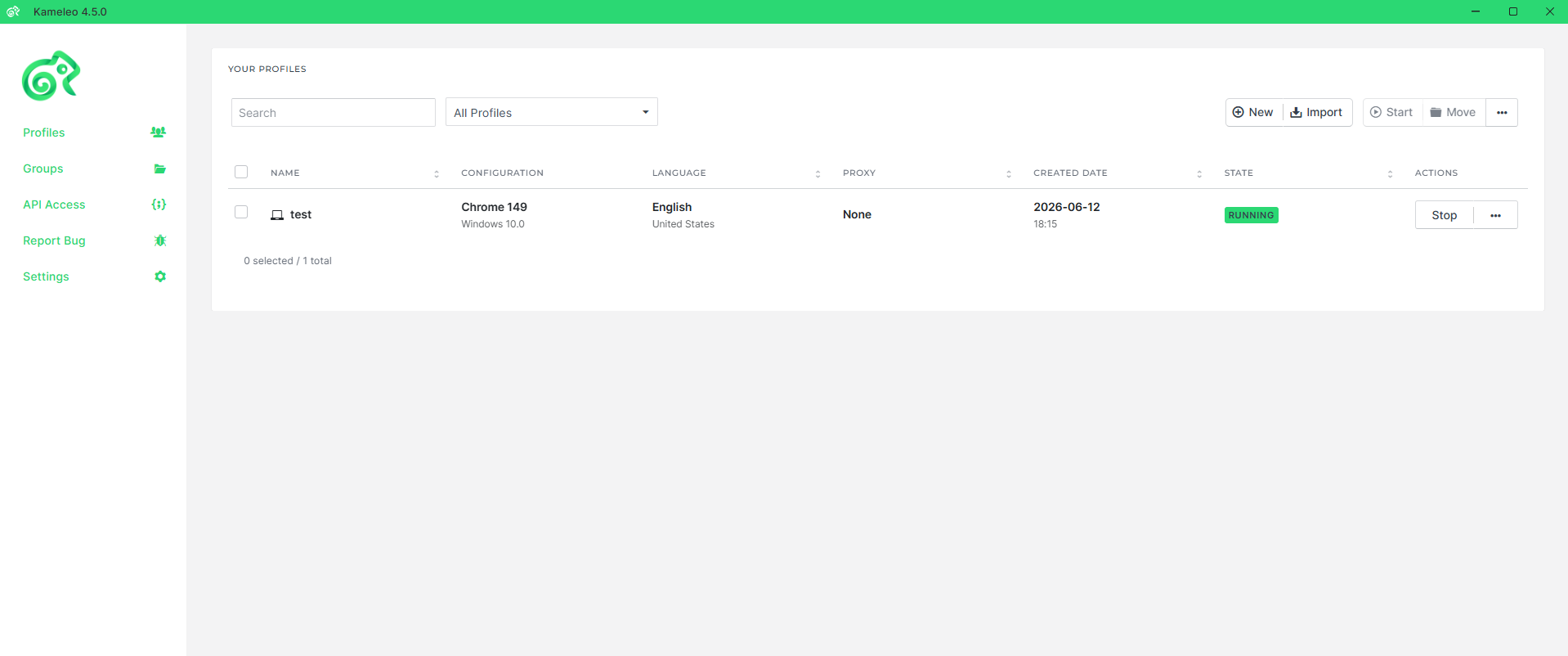
Test machine is my own Windows 11 desktop. I installed Kameleo 4.5.0, created a profile named "test" with the settings a first-time user gets steered into: a Chrome 149 fingerprint on Windows 10, English (United States), local storage, no proxy attached to the profile. On top of that I left Proton VPN running system-wide — the standard opsec stack you'll see in any fraud forum thread: antidetect browser for the device layer, VPN for the network layer.
What Kameleo Claims My Machine Is
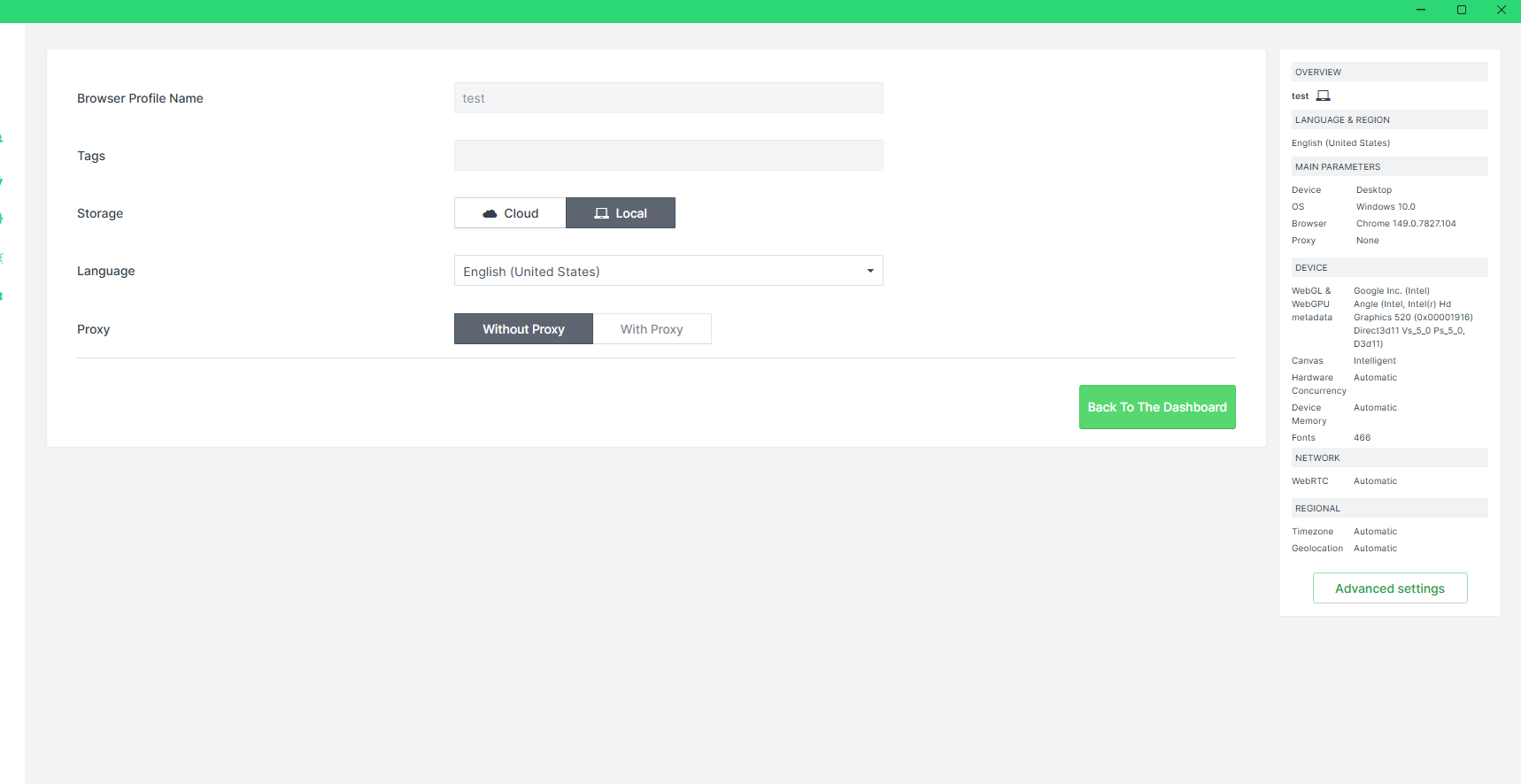
Kameleo's profile editor shows you the identity it's going to present. For this profile it decided my machine is:
- GPU: Google Inc. (Intel) — ANGLE, Intel HD Graphics 520, Direct3D 11 (spoofed WebGL and WebGPU metadata)
- OS: Windows 10 (the host is Windows 11)
- Canvas: "Intelligent" mode — per-profile noise injected into canvas reads
- Fonts: a synthetic list of 466 fonts
- Hardware concurrency, device memory, WebRTC, timezone, geolocation: all set to "Automatic"
Every one of those values looks plausible in isolation. That's the point of an antidetect browser — each individual signal passes a sniff test. The problem is that a browser isn't a list of values. It's a running system where the GPU string has to agree with how pixels actually render, the OS claim has to agree with platform-level behavior, and the "noise" hiding your canvas hash has to look like hardware variation rather than injected randomness.
The Result: Flagged at 100
I opened sntlhq.com inside the Kameleo profile. The homepage scanner runs the same /v1/evaluate pipeline customers call from their backends. First scan, no retries:
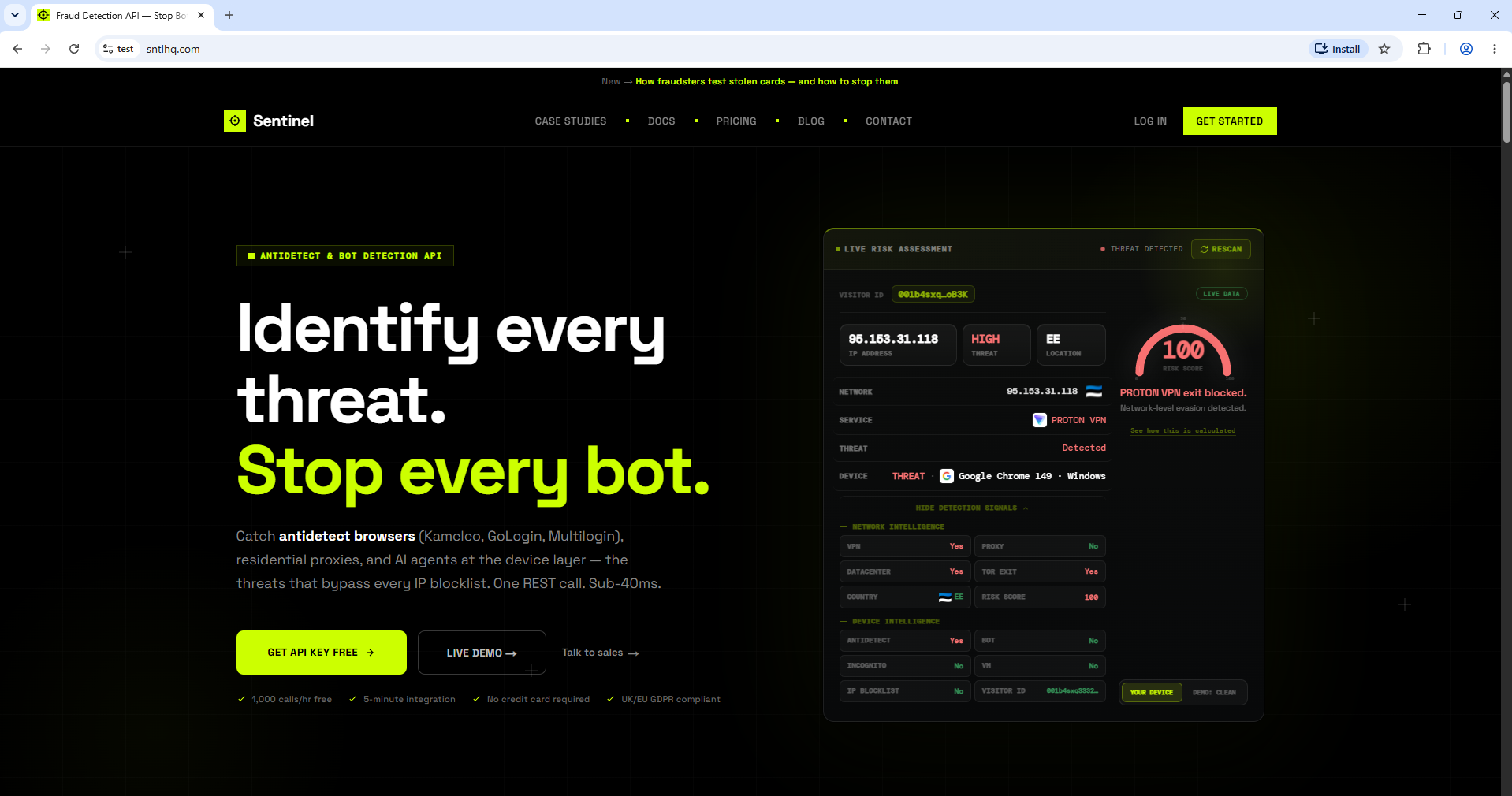
Two separate layers fired, and this matters more than the score itself:
- Device intelligence:
ANTIDETECT: Yes. The browser presenting itself as "Google Chrome 149 · Windows" was flagged as a tampered environment. This verdict has nothing to do with the IP — it comes from fingerprint consistency analysis. - Network intelligence: the Proton VPN exit was identified and the connection marked as VPN + datacenter infrastructure. "PROTON VPN exit blocked" — network-level evasion detected.
That independence is the whole game. Turn the VPN off and the device layer still flags the browser. Swap the VPN for a paid residential proxy with a spotless IP reputation and the device layer still flags the browser. The two most common evasion upgrades don't touch the signal that caught it.
Why Kameleo Gets Caught
I'm not going to publish the exact checks (the vendors read this blog too), but the categories are no secret — I covered them in depth in the complete antidetect detection guide:
- Render-vs-claim contradictions. The profile says Intel HD Graphics 520, but actual rendering output and performance characteristics belong to different silicon. Spoofing the metadata string is trivial; spoofing how a GPU draws is not.
- OS claims vs platform truth. A "Windows 10" profile on a Windows 11 host leaks the difference through platform-level signals that the spoof layer doesn't reach.
- The noise is the signature. "Intelligent" canvas mode injects per-profile randomness so every profile hashes differently. Real hardware doesn't produce that class of variation — statistically, injected noise is itself detectable.
- Synthetic font lists. An enumerated list of 466 fonts has to agree with what text measurement actually reports. Emulated lists drift from rendered reality.
Undetectable: Same Story, Plus a Bot Flag
Second tool: Undetectable, fresh Chromium-based profile — Windows 11, Chrome 149. Its profile panel is interesting because it shows exactly which signals are real and which are faked: WebGL metadata spoofed to an ANGLE/NVIDIA stack and WebGPU set to "Mask", while canvas, audio, WebGL image and ClientRects stay "System" (real), with fonts, window size and speech set to "Emulate".
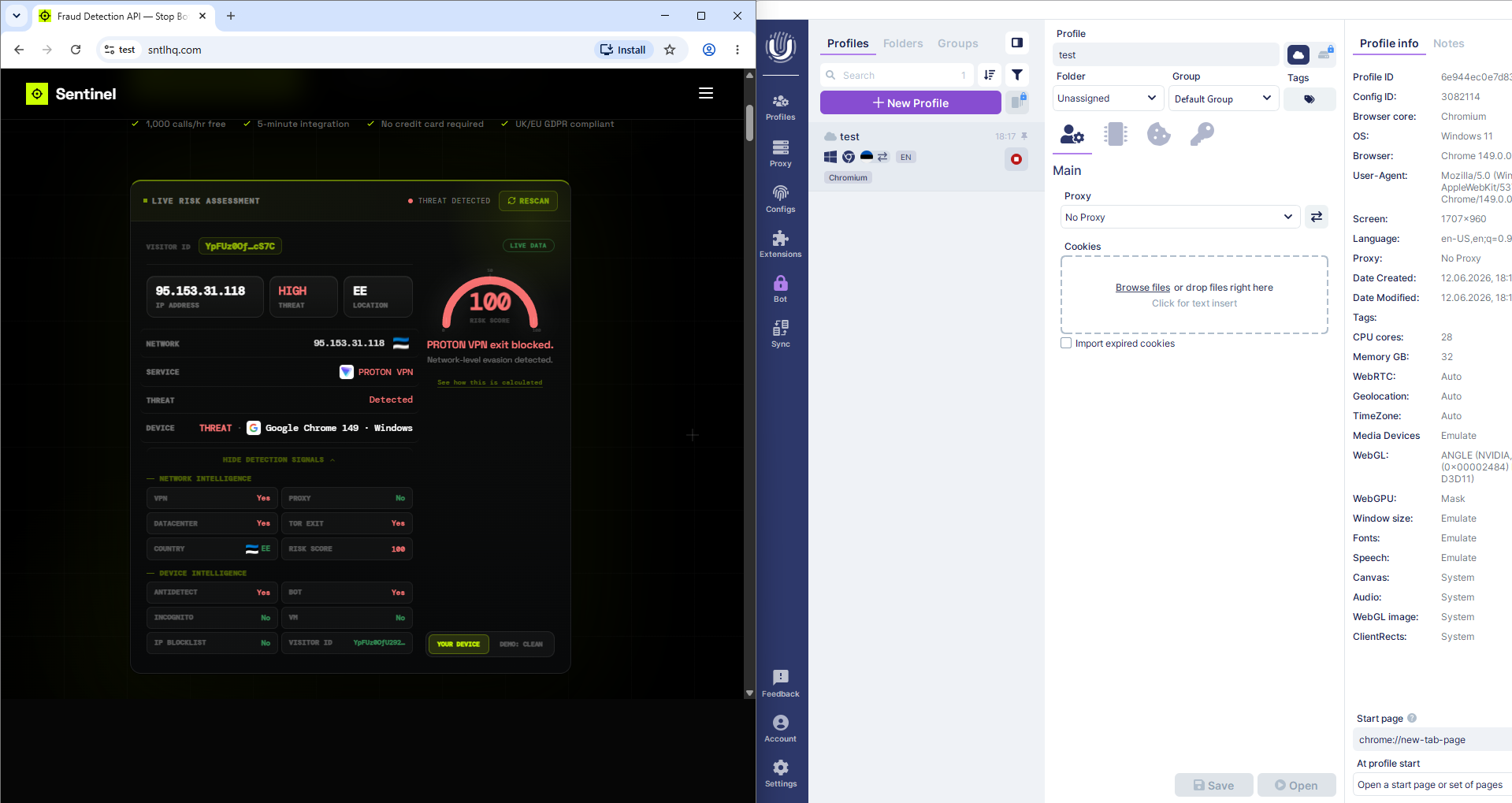
That half-real, half-emulated mix is precisely the weakness. A genuine NVIDIA machine produces NVIDIA-consistent canvas and audio output. A profile that reports NVIDIA WebGL metadata while exposing the host's actual canvas and audio behavior is contradicting itself — and contradiction is what consistency analysis is built to find. Undetectable scored risk 100 with both ANTIDETECT: Yes and BOT: Yes on the first scan.
What This Means for Your Fraud Stack
If your stack is IP-reputation only — IPQS, a blocklist, a GeoIP rule — everything in the left column of these screenshots is invisible to you. Pair either of these browsers with a clean residential proxy instead of Proton and an IP-only stack returns isSuspicious: false while a single operator runs five hundred "different" devices against your signup flow. The device layer isn't an optional extra anymore; it's where the actual detection happens. Network intelligence tells you how the traffic got to you, device intelligence tells you what's actually running — you need both verdicts in the same API response.
Try It Yourself — Seriously
The scanner in these screenshots is live on the homepage — it runs the same pipeline as the production API. If you operate an antidetect browser and find a configuration that scans clean, I genuinely want to hear from you. That's not bravado; reports like that are how the detection gets better. More browsers are queued for this series — GoLogin, Multilogin, AdsPower and Dolphin{anty} are next.